Y.js 14 & @y/prosemirror

As we announced at FOSDEM '26, we are working on a new version of the y-prosemirror package (soon to be @y/prosemirror), and aim to address several architectural issues with the previous binding.
Goals
- Apply minimal diffs to the ProseMirror state from Y.js updates, avoiding issues with decorations and anything which relies on position mapping
- Support for pausing the sync process, and resuming it again to allow local-only editing
- Support for rendering content that is not actually within the current Y.js document into the ProseMirror document, like rendering the changes between two document snapshots as a diff, or suggestions from another Y.js document
- A more "ProseMirror-native" API, with a simple core API and a set of commands for more complex operations
- Better capture of ProseMirror changes, by capturing only transactions which have been applied to the
EditorView
APIs
Here is an overview of the updates we have planned in Y.js 14 and y/prosemirror.
Unified Y.Type (Y.js 14)

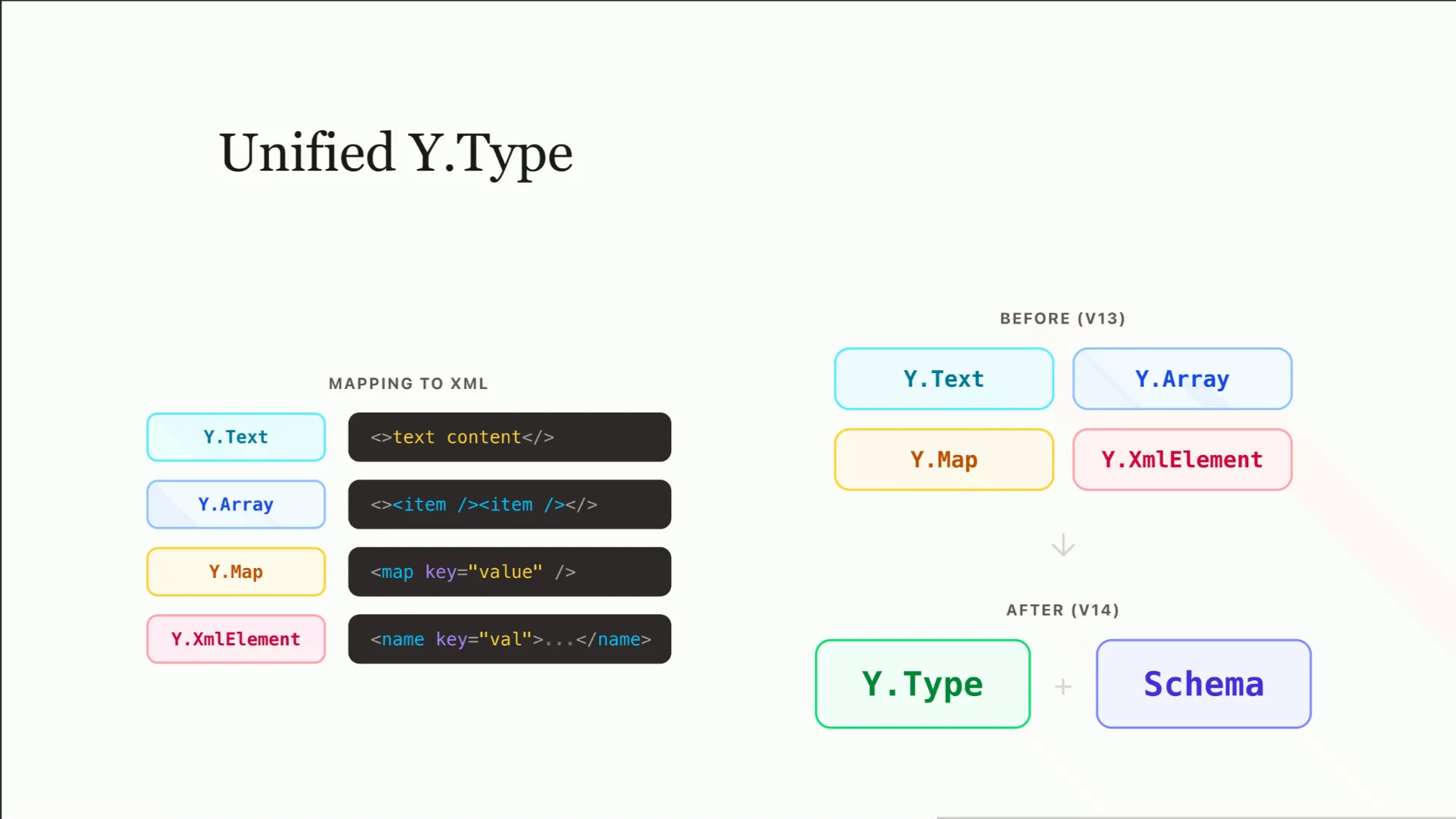
One of the largest changes in Y.js 14 will be the unification of the different types available in Y.js (i.e. Map, Text, Xml, etc.) into a single unified interface, Type which is essentially an XML Element with optional name, attributes and children.
Another important change to Y.js is the introduction of a schema for Y.Doc enforcement of specific document shapes. This should allow you to express your document shape using a zod-like API.
Deltas (lib0/delta)
Deltas are the core unit of change within the new @y/prosemirror package, they are an OT-like data structure which represents documents as changesets (similar to Quill's deltas). With Deltas, we have a CRDT agnostic representation of changes between documents. The current document state can be described as the delta between an empty document and the current document state. Deltas can be re-based, diffed, and applied to documents. So, the core goal of the package is to provide a binding between Deltas & ProseMirror. To see more information on deltas, see this test file for more of a walk-through of how they work internally (sorry that we have not gotten around to proper documentation yet).
One of the core premises of deltas is that we are describing the document as a sequence of changes rather than a final data structure. This allows for a unified API for describing changes between documents, and for applying changes to documents.
This is a quick primer on deltas, what they are, and how they work.

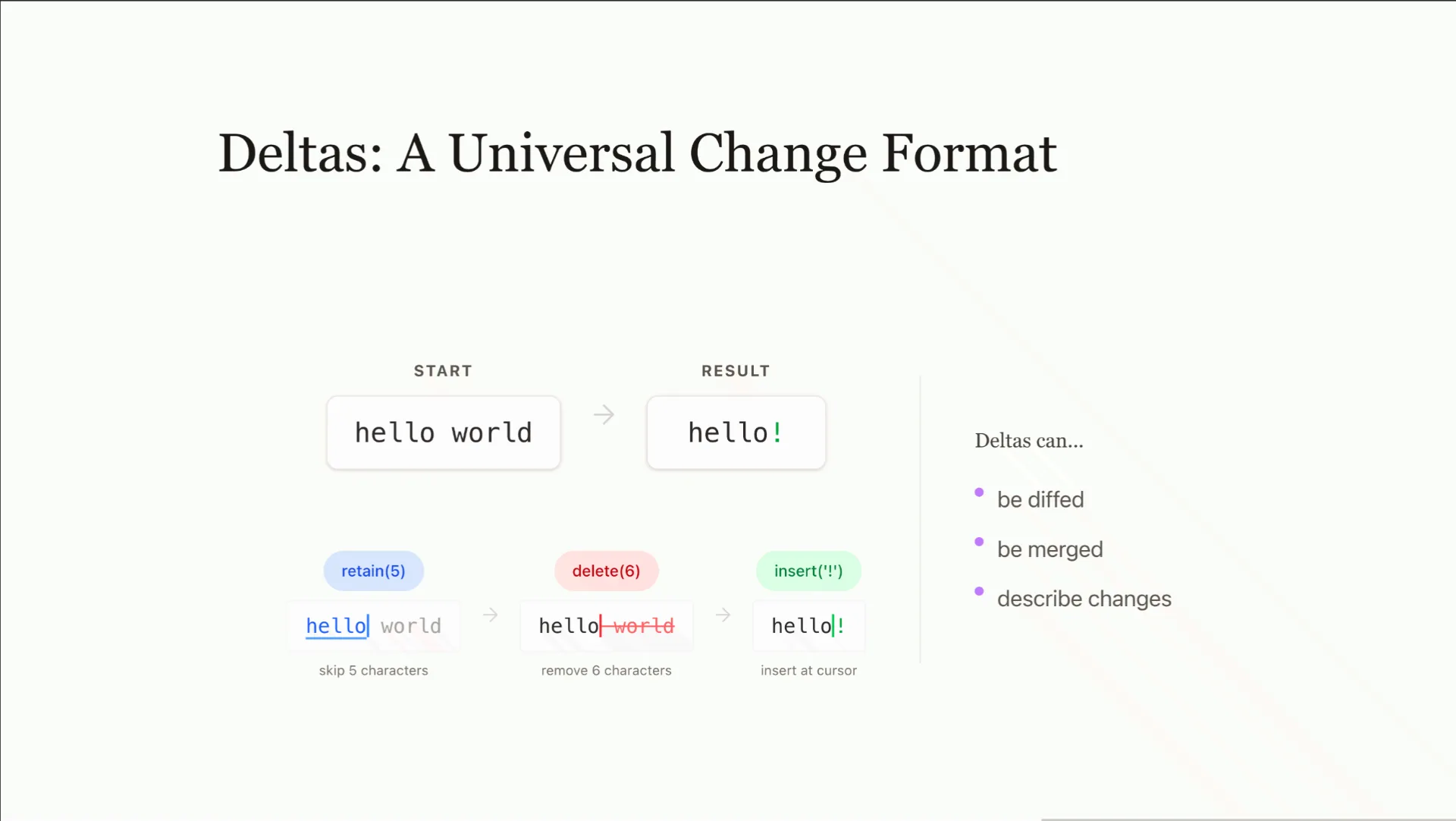
Delta is a versatile format that lets you efficiently describe changes. It is part of lib0, so non-yjs applications can use it without pulling in the full Y.js package. It is well suited for efficiently describing state and changesets.
Suppose we start with the text "hello world" and want to delete " world" and add an exclamation mark, so the final content reads "hello!". In most editors, you would describe the necessary changes as replace operations using indexes; deleting a specific range, then inserting at a specific position. This approach can become confusing when many changes are involved.
With the delta format, you describe changes the way you would make them in a text editor, walking through the document from left to right with a moving cursor. Rather than referencing absolute positions, you retain a run of characters to advance the cursor, delete a run to remove characters, and insert new content at the current location. The operations chain together naturally to express the full transformation.
The format also supports composing changes across time. You can construct two independent deltas and rebase one on top of the other, which adjusts its positions to account for the changes introduced by the first. Alternatively, you can merge two deltas into a single combined change. This makes the format well suited not just for describing edits, but for reasoning about how concurrent or sequential edits interact.
Content Renderer (@y/y)

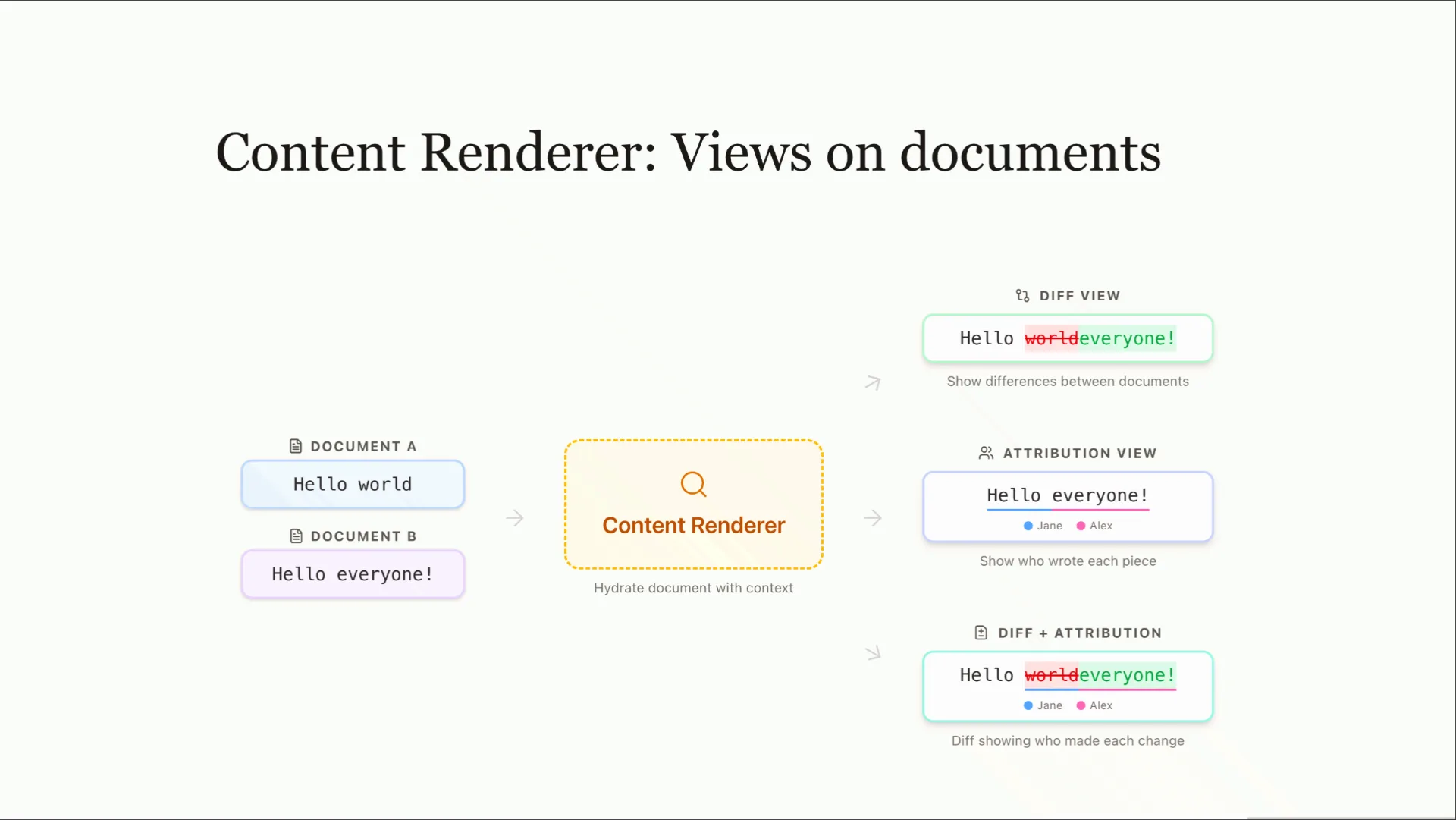
One of the core features in the next version of @y/y is the concept of a "content renderer", which we are planning to support in @y/prosemirror. A content renderer is responsible for the injection of additional content into the ProseMirror document, such as suggestions, diffs, etc. This content renderer is able to keep track of the source of the additional content, and can differentiate changes to the original document content from changes to the additional content. This is particularly useful for "suggestion mode", where we want to still show the original document content, but also being able to edit the suggestions independently.
ProseMirror → Delta
/**
 * Converts a ProseMirror document node to a lib0 delta.
 * @returns {Delta} The returned delta is a diff between an empty node and the document node (i.e. insertions only).
 */
function nodeToDelta(doc: Node): Delta;

/**
 * Converts a ProseMirror transform to a lib0 delta.
 * @returns {Delta} The returned delta is a diff between {@link tr.before} and {@link tr.doc} document states.
 */
function trToDelta(tr: Transform): Delta;
With this, we can directly map either a ProseMirror document node or a ProseMirror transform into a lib0 delta. This is because a delta is a list of inserts, deletes, and retains, allowing us to represent each step of the transform as a delta operation. We hope to be able to map each step of the transform to a delta operation, but in some cases, we may need to fall back to diffing the document to see what the transform intended the change to be.
Delta → ProseMirror
/**
 * Applies a lib0 delta to a ProseMirror document node.
 * @returns {Transform | null} The returned transform is a transform that can be applied to the document node to apply the delta. Or, null if the delta is not applicable to the document.
 */
function applyDelta(doc: Node, delta: Delta): Transform | null;

/**
 * Converts a lib0 delta to a ProseMirror node
 */
function deltaToNode(delta: Delta): Node;
In the other direction, we can apply a lib0 delta to a ProseMirror document node, which will return the series of steps that need to be applied to the document to result in the transformation that the delta represents. We hope to make this as efficient as possible, by creating minimal diffs and compressing operations where possible. Y.js will emit it's changes as deltas, meaning that in ProseMirror, we should see minimal changes being applied to the document.
Delta Sync Plugin
The goal of this plugin is to coordinate syncing the ProseMirror document with a Y.js, through the use of deltas.
function ySyncPlugin(opts: {
    /**
     * The Y.js type to sync with.
     **/
    yType: Y.YType;
    /**
     * A content renderer is responsible for rendering any additional content that is not part of the main ProseMirror document (e.g. suggestions, diffs, etc).
     **/
    contentRenderer: Y.ContentRenderer;
    /**
     * This will take Y.js attributions and allow you to map them into ProseMirror marks.
     **/
    mapAttributionToMark?: (attribution: Y.Attribution) => Mark;
}): Plugin<PluginState<{
  /**
   * The current active Y.js type that is being synced with.
   */
  yType: Y.YType | null;
  /**
   * The current active content renderer that is being used to render additional content.
   */
  contentRenderer: Y.ContentRenderer | null;
  /**
   * Captured transactions are the transactions that have occurred since the last sync to the Y.js type.
   */
  capturedTransactions: Transaction[];
}>>;
One issue we have with the structure of this plugin is the capturedTransactions field. The problem is that we need a way to capture changes to the editor, but are really only interested in the changes which have actually been committed to the view. Ideally, we'd have a 1:1 mapping of a ProseMirror transaction to a Y.js delta (though we understand that this may not always be possible). Given this, it seems like the best approach is to capture the transactions that have occurred between view.update invocations, which we can then sync back to the Y.js type. If there is a better approach to this, we would be happy to get rid of this.
Position Mapping
There is a difference between positions within a ProseMirror document, and positions within a Y.js document.
A ProseMirror position is an absolute position, meaning it is only valid within the current ProseMirror document, and when the document is updated, that position may change. ProseMirror positions are transformed through position mappings as discussed here, this will not be sufficient in a Y.js based document, since changes may come in at any time, invalidating the mapping.
Y.js has the concept of a relative position, meaning it is a position that is relative to a specific Y.js type (e.g. the current text node within the document). This is more robust to changes, since changes to the document will not invalidate the relative position.
For smoothing over this difference, we can create a mapping between ProseMirror positions & Y.js relative positions which can be used to transform positions between the two. We have two symmetric functions for this:
/**
 * Given a Prosemirror absolute position, the ytype, and the prosemirror document, return the corresponding Y.js relative position.
 **/
function absolutePositionToRelativePosition(pos: number, type: Y.YType, pmDoc: Node): Y.RelativePosition;

/**
 * Given a Y.js relative position, the ytype, and the prosemirror document, return the corresponding Prosemirror absolute position.
 **/
function relativePositionToAbsolutePosition(relPos: Y.RelativePosition, type: Y.YType, pmDoc: Node): number;
We also can leverage ProseMirror's Mappable interface to create a mapping between ProseMirror positions & Y.js relative positions.
First we capture the mapping of the current positions, and then later we can restore the mapping to the original positions.
function capturePositionMapping(pmDoc: Node, type: Y.YType): {
  captureMapping: (clear?: boolean)=> Mappable;
  restoreMapping: (type: Y.YType, pmDoc: Node) => Mappable;
};

const { captureMapping, restoreMapping } = capturePositionMapping(pmDoc, type);

const bookmark = view.state.selection.getBookmark();
// record the current positions of the bookmark (in-memory as a Y.RelativePosition)
bookmark.map(captureMapping())

// later, after possible document edits, we can restore the mapping to the original positions
const resolvedBookmark = bookmark.map(restoreMapping(pmDoc, type))
Commands
We are adding a set of commands to the @y/prosemirror package to enable more complex operations.
/**
 * This command will pause the synchronization between the Prosemirror document and the Y.js type. Allowing for local only editing.
 **/
function pauseSync(): Command;

/**
 * This command will resume the synchronization between the Prosemirror document and the provided Y.js type.
 **/
function resumeSync(ctx: {
  /**
   * The Y.js type to sync with.
   **/
  yType: Y.YType;
  /**
   * The content renderer to use for rendering additional content.
   **/
  contentRenderer: Y.ContentRenderer | null;
}): Command;

/**
 * This command will render a snapshot of the provided Y.js fragment at the given snapshot point in time. This is useful for rendering changes between two document snapshots as a diff.
 **/
function renderSnapshot(snapshot: {
  /**
   * The Y.js fragment to render.
   **/
  fragment: Y.YType;
  /**
   * The snapshot point in time to render.
   **/
  snapshot: Y.Snapshot;
}, prevSnapshot?: {
  /**
   * The Y.js fragment to render.
   **/
  fragment: Y.YType;
  /**
   * The snapshot point in time to render.
   **/
  snapshot: Y.Snapshot;
}): Command;

/**
 * This command will enter suggestion mode. In suggestion mode, the content renderer will be used to render additional content, such as suggestions, diffs, etc.
 **/
function suggestionMode(doc: Y.YType, suggestionDoc: Y.YType): Command;
These commands are not finalized, but we hope they should get across the idea of the commands that we are considering for the @y/prosemirror package.
Putting it all together
We see @y/prosemirror as the bridge between the ProseMirror editor state and Y.js documents. It is responsible for synchronization (via Deltas), rendering suggested content & attributions when provided a content renderer.